

Description
Download TradeGecko – Business Management, Inventory Management, Invoicing
Overview
TradeGecko is a desktop application designed to streamline the administrative operations of wholesale businesses. Built for importers, distributors, manufacturers, and designer-makers, it offers a centralized platform to manage inventory, orders, invoicing, and financial workflows. The software reimagines traditional business management tools by introducing a more social and collaborative interface, emphasizing team engagement through activity feeds and real-time updates. By reducing manual data entry and eliminating double-handling errors, TradeGecko helps businesses reclaim valuable time and redirect focus toward strategic growth areas.
Unlike enterprise-level systems such as SAP or NetSuite, TradeGecko positions itself as a scalable alternative for mid-sized operations that need more structure than spreadsheets but don’t require complex enterprise infrastructure. It supports multi-user access and real-time data syncing across devices, making it ideal for teams that operate across multiple locations or time zones. The platform’s cloud-based architecture ensures continuous availability and automatic updates, minimizing downtime and maintenance overhead.
The developer, TradeGecko, has positioned the software as a modern, user-centric solution tailored to the unique challenges of wholesale commerce. While specific company background details are not provided, the product’s design philosophy reflects a clear intent to improve business efficiency through intuitive workflows and enhanced visibility into daily operations. Its use cases span from small-scale importers managing product catalogs to larger distributors tracking order fulfillment and supplier relationships.
Key Features & Capabilities
- Inventory Management: Track stock levels in real time across multiple locations, set reorder points, and generate automated alerts when stock reaches critical thresholds.
- Order Management: Create, process, and track purchase and sales orders from start to finish, with built-in approval workflows and status tracking.
- Invoicing & Financial Management: Generate professional invoices, manage payment terms, and sync financial data with accounting systems to reduce manual reconciliation.
- Workflow Automation: Automate repetitive tasks such as order confirmation, inventory updates, and client notifications based on predefined triggers.
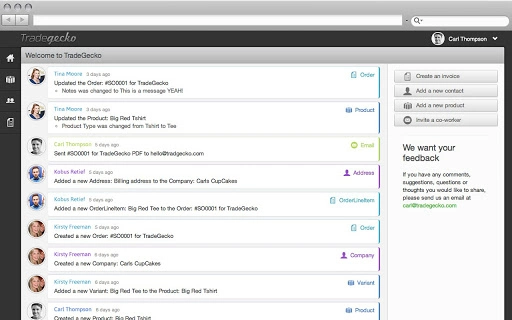
- Team Collaboration & Activity Feeds: Enable team members to communicate within the platform via activity streams, share updates, and assign tasks without leaving the workspace.
- Real-Time Data Visibility: Access up-to-date business metrics and performance indicators through customizable dashboards and reports.
- Multi-User Access & Role-Based Permissions: Assign different access levels to team members, ensuring data security while enabling efficient collaboration.
- Supplier & Product Catalog Management: Maintain a centralized database of suppliers, pricing, and product details for faster procurement and sales processes.
These features collectively support end-to-end business operations, allowing users to manage everything from initial purchase orders to final invoicing and financial reporting. The automation capabilities reduce human error and save hours per week on routine tasks. For example, a distributor can set up an automatic alert when inventory drops below a certain level, triggering a reorder request without manual intervention. Similarly, a designer-maker can use the activity feed to keep team members informed about production milestones and shipment statuses.
User Interface, Workflow & Performance
TradeGecko features a clean, modern user interface designed with productivity in mind. The layout emphasizes clarity and workflow continuity, with key functions accessible via intuitive navigation menus and dashboard widgets. Users can quickly switch between modules such as inventory, orders, and invoicing using a centralized sidebar or keyboard shortcuts, minimizing context switching.
Navigation is structured around core business processes, guiding users through logical steps—from creating a new order to issuing an invoice. The interface supports drag-and-drop functionality for organizing product catalogs and managing inventory bins. Activity feeds are prominently displayed, enabling teams to stay aligned without relying on external communication tools.
Performance observations are based on general software behavior patterns. The application runs on a cloud-based architecture, which means most processing occurs on remote servers, reducing local resource demands. However, the developer did not specify resource usage details. Stability is expected to be high due to the cloud infrastructure, which typically handles load balancing and failover mechanisms. Users can expect consistent performance across Windows, Mac, and Linux platforms, though actual behavior may vary based on network speed and device specifications.
Compatibility & System Requirements
TradeGecko is available for Windows, Mac, and Linux operating systems, making it accessible to a wide range of users across different computing environments. The software has a download size of 150 MB, which suggests a lightweight installation package suitable for most modern machines.
Exact system requirements were not listed by the developer. However, given the application’s cloud-based nature and desktop client interface, it likely runs on machines with standard hardware configurations. The developer did not provide additional system requirements, so users should ensure their devices meet general desktop software standards. Compatibility with older OS versions is not confirmed.
Pros and Cons
Pros
- Centralized management of inventory, orders, and invoicing
- Real-time data visibility and synchronization across teams
- Intuitive interface with strong workflow design
- Supports multi-user collaboration with role-based access
- Automates repetitive business processes
- Cloud-based with no local server maintenance required
- Available on Windows, Mac, and Linux platforms
- Free to download and use
Cons
- Exact system requirements were not specified
- Performance details under varying workloads were not provided
- Advanced customization options may be limited
- Dependence on stable internet connection for full functionality
- Limited information on third-party integrations
- No offline mode mentioned in documentation
FAQ Section
Is TradeGecko compatible with my operating system?
TradeGecko is designed to run on Windows, Mac, and Linux systems. While specific version compatibility was not detailed, the software is intended for modern desktop environments.
Is TradeGecko safe to download and use?
As a cloud-based desktop application, TradeGecko uses secure protocols to protect data transmission. The developer has not disclosed specific security certifications, but standard cloud security practices are assumed.
How often does TradeGecko update?
Updates are delivered automatically through the cloud platform. The latest version is always available upon launch, ensuring users benefit from the most recent features and security patches.
What type of license does TradeGecko use?
TradeGecko is offered as a free software application with no licensing fees. Users can download and use it without purchasing a subscription or license.
Can I use TradeGecko offline?
The developer did not specify whether offline functionality is supported. Given its cloud-based architecture, full functionality likely requires an active internet connection.
Final Thoughts + CTA
TradeGecko stands out as a powerful, no-cost solution for wholesale businesses seeking to automate and centralize their operations. Its combination of inventory management, order tracking, invoicing, and team collaboration tools makes it a compelling choice for importers, distributors, and manufacturers looking to reduce administrative overhead. The clean interface, real-time data access, and cross-platform availability further enhance its appeal.
While detailed technical specifications and performance benchmarks were not provided, the software’s cloud-first design suggests reliability and scalability. It fills a critical gap between basic spreadsheets and complex enterprise systems, offering a balanced, modern approach to business management.
For teams that value efficiency, visibility, and collaboration, TradeGecko delivers tangible benefits. Whether managing a growing product catalog or streamlining order fulfillment, this tool helps businesses reclaim time and focus on what matters most.
Download TradeGecko now
Guides & Tutorials for TradeGecko Inventory Management Software App for Chrome
How to install TradeGecko Inventory Management Software App for Chrome
- Click the Preview / Download button above.
- Once redirected, accept the terms and click Install.
- Wait for the TradeGecko Inventory Management Software App for Chrome download to finish on your device.
How to use TradeGecko Inventory Management Software App for Chrome
This software is primarily used for its core features described above. Open the app after installation to explore its capabilities.
User Reviews for TradeGecko Inventory Management Software App for Chrome 0
No reviews found





